 | With the issuance of exam badges as of April 4, 2023, we are transitioning away from issuing Fortinet exam certificates. For more information, see Do Exam Badges Replace Exam Certificates? |
To download your NSE certifications:
- Log into the Fortinet Training Institute portal. For more information, see How do I log in to the Fortinet Training Institute portal?
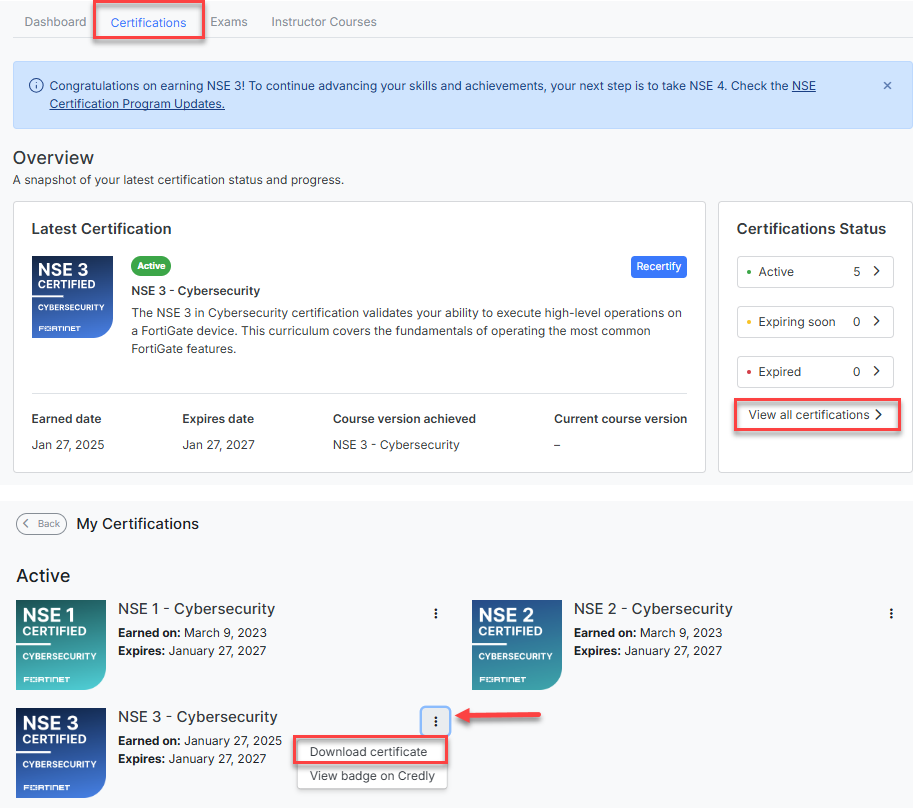
- Click Certifications in the top menu.
- You must select the NSE Certification track first if you have not selected it before.
- Click View all certifications
- Click on the three top Certifications tab
- Click Download certificate
Your Pearson VUE records will automatically be associated with your Fortinet Training Institute account if you signed up to Pearson VUE using the same email address that you use to log in to the Fortinet Training Institute portal.
If you used a different email address when registering to Pearson VUE, you need to request Fortinet to associate your Pearson VUE records to your Fortinet Training Institute account as follows:
- Log into the Fortinet Training Institute helpdesk portal.
- Click Submit a ticket.
- Complete the form with the information of your Pearson VUE Fortinet ID (What is a Pearson VUE Fortinet ID and how can I get one?)
- Click Submit.
A Fortinet Training Institute representative will contact you shortly. You can follow up and keep track of your Fortinet Training Institute helpdesk requests through https://helpdesk.training.fortinet.com/en/support/tickets
Was this article helpful?
That’s Great!
Thank you for your feedback
Sorry! We couldn't be helpful
Thank you for your feedback
Feedback sent
We appreciate your effort and will try to fix the article