Some Fast Track courses have limited resources either due to account or physical hardware restrictions.
Limitations and Considerations
As with any workshop, it is important to request only the number of workspaces required for your specific class size. Over provisioning of workshops will result in fewer workspaces being available for other instructors sessions.
The new scheduler/calendar system takes into account the following requirements:
- Every request includes enough workspace for not only the students requested but also every instructor that has been assigned to your session. If you request 20 students, and have 2 instructors then a total of 22 workspaces will be reserved as part of your request. You only need to specify the number of students on the request form.
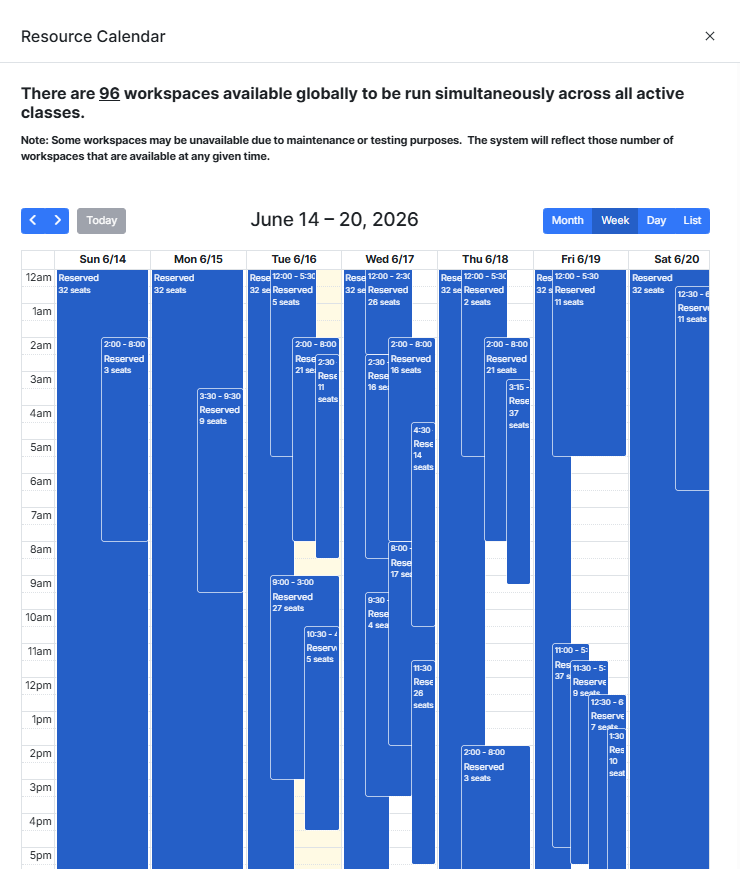
- Each workspace will run for the default class duration of 5 hours. However, for resource limited workshops we must take into account the provisioning time as well. If you look at any request in the calendar you will see that it has a total runtime of 6 hours. This automatically includes the 1 hour provisioning required. Instructors are not required to do anything special to account for this, as it is handled automatically by the system.
- It is not possible for Instructors to directly resize their classes. All requests to resize must be requested through the operations team fasttrack@fortinet.com, and they will review if there are available workspaces to satisfy your request.
The following list describes the limitations for each course.
SD-Branch
There are 96 workspaces available globally to be run simultaneously across all active classes.
(Effective April 29, 2026, this was increased from 64 to 96)
SASE
There are 40 workspaces available globally to be run simultaneously across all active classes.
Calendars
A calendar is to be used by instructors to identify available time slots and the number of available workspaces.
Calendar Example
Calendar Links
SD-Branch
SD-Branch: LAN Edge Wired and Wireless
SASE
Securing the Hybrid Workforce with SASE
When viewing the calendar, you will see all classes that have been requested and approved. The calendar events will include the number of reserved workspaces (students + instructors) as well as the duration of the session (including provisioning time).
Lab Scheduler
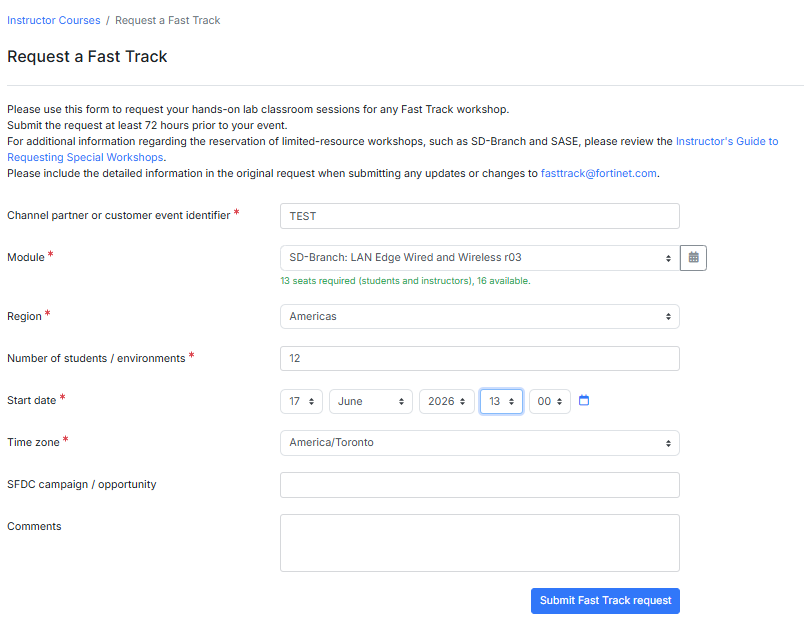
When scheduling your class on the Training Institute portal, you only need to set the start time of when you want the workspaces to be available for your students to access. This is the start of your 5-hour run time.
To determine if your request will be approved you simply need to complete the information in the form. Once added, text will appear under the Module name indicating if there are enough seats available to satisfy your request.
If the resources are currently available you can submit your request for approval. Note that this does not guarantee that your request will be honored. It is possible that there area already other requests in the queue that have not been approved yet, that will create a conflict. The operations team uses a first in / first out method when approving requests.
Was this article helpful?
That’s Great!
Thank you for your feedback
Sorry! We couldn't be helpful
Thank you for your feedback
Feedback sent
We appreciate your effort and will try to fix the article