To request a Fast Track course, follow the steps below:
Prerequisite: If the ‘Instructor courses’ feature is missing from the left panel navigation, please contact the administrator to provide you with the access.
Step 1: Log into Fortinet Training Institute portal.
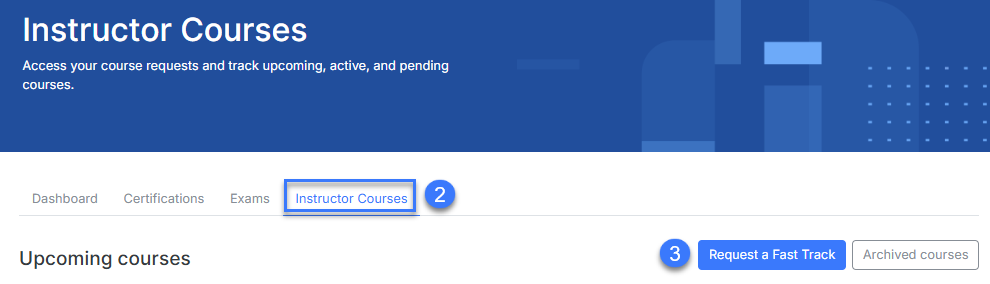
Step 2: Click on Instructor courses.
Step 3: Click on Request a Fast Track button.
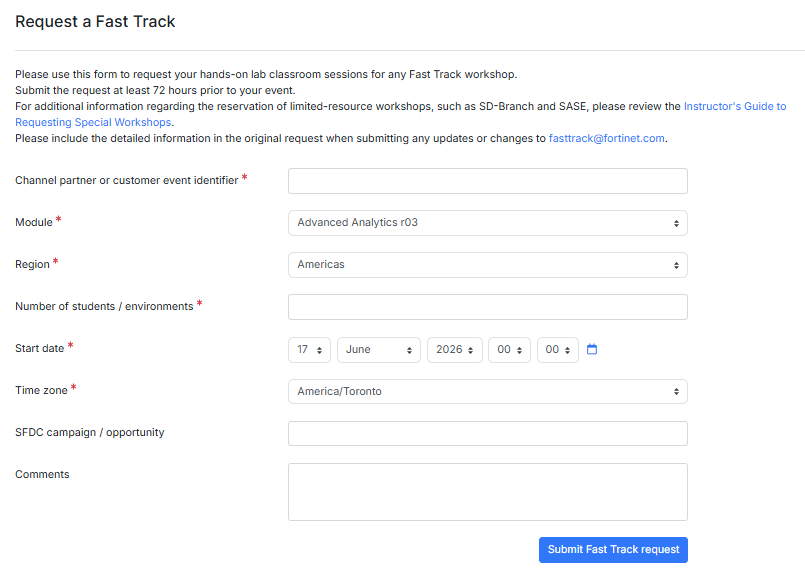
Step 4: Fill up the following details under Request a Fast Track form before you click on Submit Fast Track request button.
You are required to fill up the field that contains this icon
- Channel partner or customer event identifier
- Module
- Region
- Number of students/environments
- Start date
- Time zone
- SFDC campaign / opportunity
- Comments
Step 5: The Fast Track workshop will be displayed under Upcoming Courses.
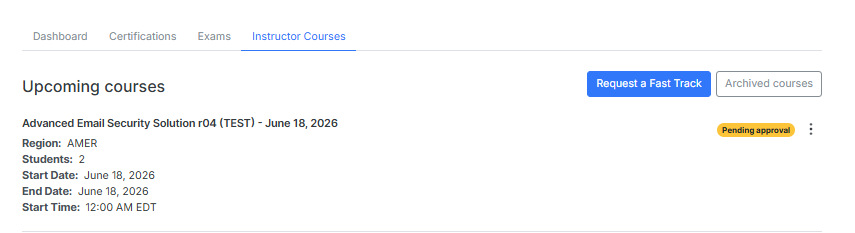
Note: If the start time of a Fast Track workshop is updated when the new start time is less than 12 hours away, the updated schedule will not be reflected under Instructor Courses. In such cases, we recommend cancelling the existing workshop and scheduling a new one with the correct start time.
Was this article helpful?
That’s Great!
Thank you for your feedback
Sorry! We couldn't be helpful
Thank you for your feedback
Feedback sent
We appreciate your effort and will try to fix the article